· Guides
Buy an EA on MQL5 — Get the MT4/MT5 Version as a Gift
Every trader who purchases any of our Expert Advisors on the official EA Quantum Lab MQL5 seller profile receives a free gift license for any EA from our marketplace — MT4 or MT5 version, your choice — as a thank-you for your honest review.
EAs you can get as a gift
Every Expert Advisor below is available through the review bonus program. You can claim any of them as a gift, including the MT4 version.
| Expert Advisor | Available gift version |
|---|---|
| EA New Level Trading | MT4 / MT5 |
| EA New Player | MT4 / MT5 |
| EA Legendary Multi Strategy | MT4 / MT5 |
| ONNX Strategy 1 | MT4 / MT5 |
| EA Synthetic Metal | MT4 / MT5 |
| AI Quantum Trading | MT4 / MT5 |
| The Last King | MT4 / MT5 |
| EA CyberPunk | MT4 / MT5 |
| EA Underdog | MT4 / MT5 |
| Old School Trading | MT4 / MT5 |
| EA Crypto Player | MT4 / MT5 |
| EA Most Wanted | MT4 / MT5 |
| EA Hamster | MT4 / MT5 |
Each gift license includes 3 account activations and 1 full year of use — same terms as a paid purchase.
Gift terms at a glance:
- Buy any EA on our MQL5 seller profile and use it for at least 3 days.
- Leave an honest review on the MQL5 product page (mention real experience, not just "great EA").
- Register on our website and submit the bonus form in your dashboard: purchased product, MQL5 username, gift EA and platform version (MT4 or MT5).
- Delivery time: your gift license is issued within 24–48 hours after the review is verified.
- One gift per MQL5 purchase; the MT4 gift version is provided as a compiled .ex4 file.
What you get
- Any EA of your choice from our marketplace — including premium bestsellers worth $149.
- MT4 or MT5 version — pick the platform you need in the bonus form.
- 3 account activations — use the gift EA on up to three trading accounts.
- 1 full year of license — same terms as a paid purchase.
One active request per user at a time. Verification usually takes 24–48 hours.
Step-by-step: how to claim your gift
Step 1 — Buy any EA on MQL5
Time: ~5 minutes. Purchase any product from our official MQL5 seller profile. Every purchase counts — no minimum price requirements. Keep your MQL5 account logged in: your review must be posted from the same account that made the purchase.
Step 2 — Use the EA for at least 3 days
Time: 3 days minimum. Run the EA on your real or demo account. This waiting period is required — reviews posted immediately after purchase look inauthentic and may be removed by MQL5 moderators.
Step 3 — Leave a review on the product page
Time: ~10 minutes. Open the product page on MQL5, go to the Reviews tab and post your review with a rating.
Review requirements:
- Posted from the same MQL5 account that purchased the EA
- Posted at least 3 days after the purchase
- With a star rating and honest text about your real experience (a few sentences is enough)
- In any language — English preferred so other traders can read it
Step 4 — Register and sign in on our website
Time: ~2 minutes. The gift is issued through your personal dashboard, so an EA Quantum Lab account is required. Open the sign-up page, create an account with your email (or continue with Google), confirm your email and sign in.
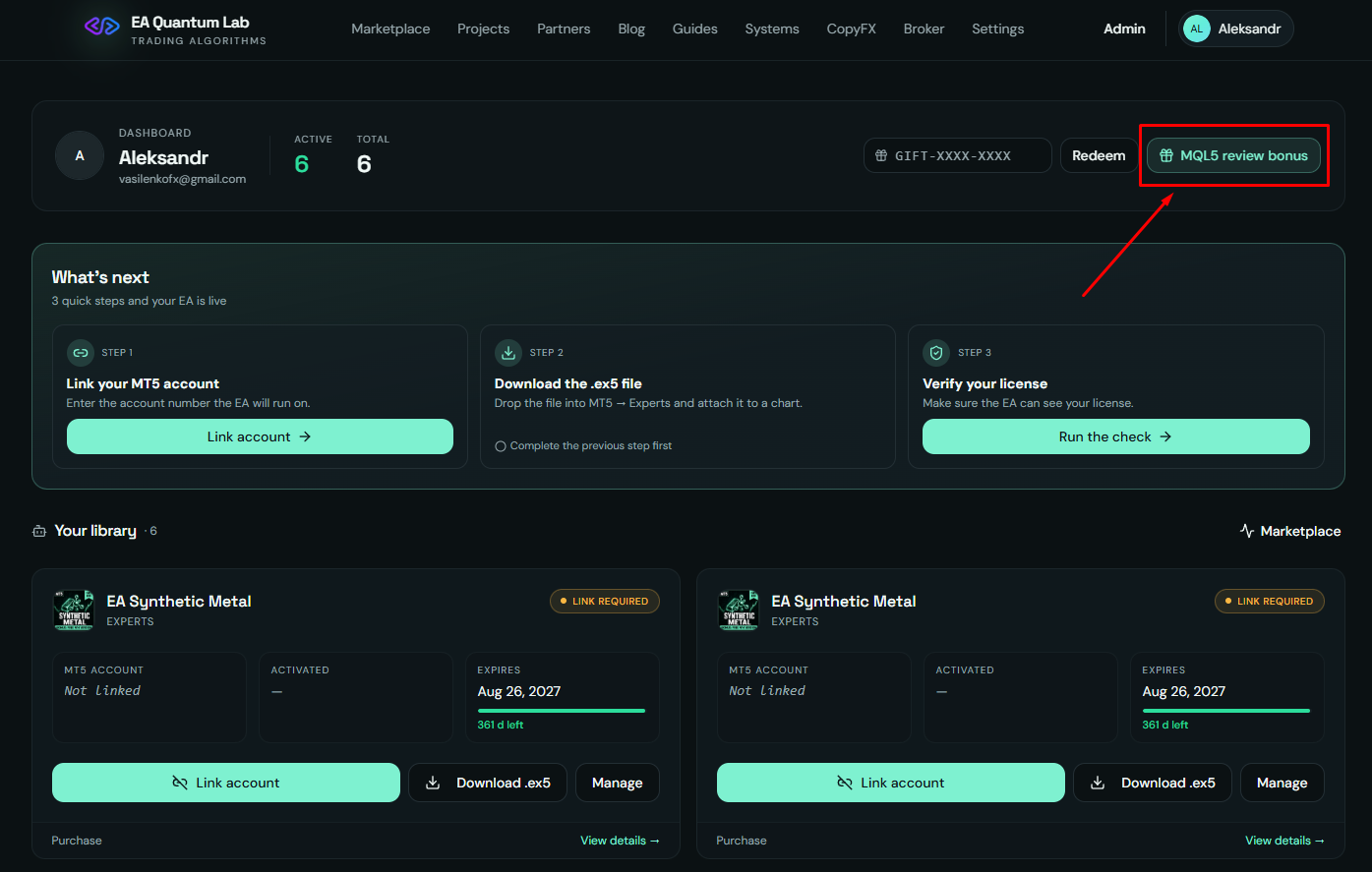
After signing in you land in your Dashboard. The MQL5 review bonus button sits in the top-right corner of the dashboard header — that is where the bonus form opens:
Step 5 — Submit the bonus form in your dashboard
Time: ~2 minutes. Open Dashboard → MQL5 review bonus. Fill in the short form:
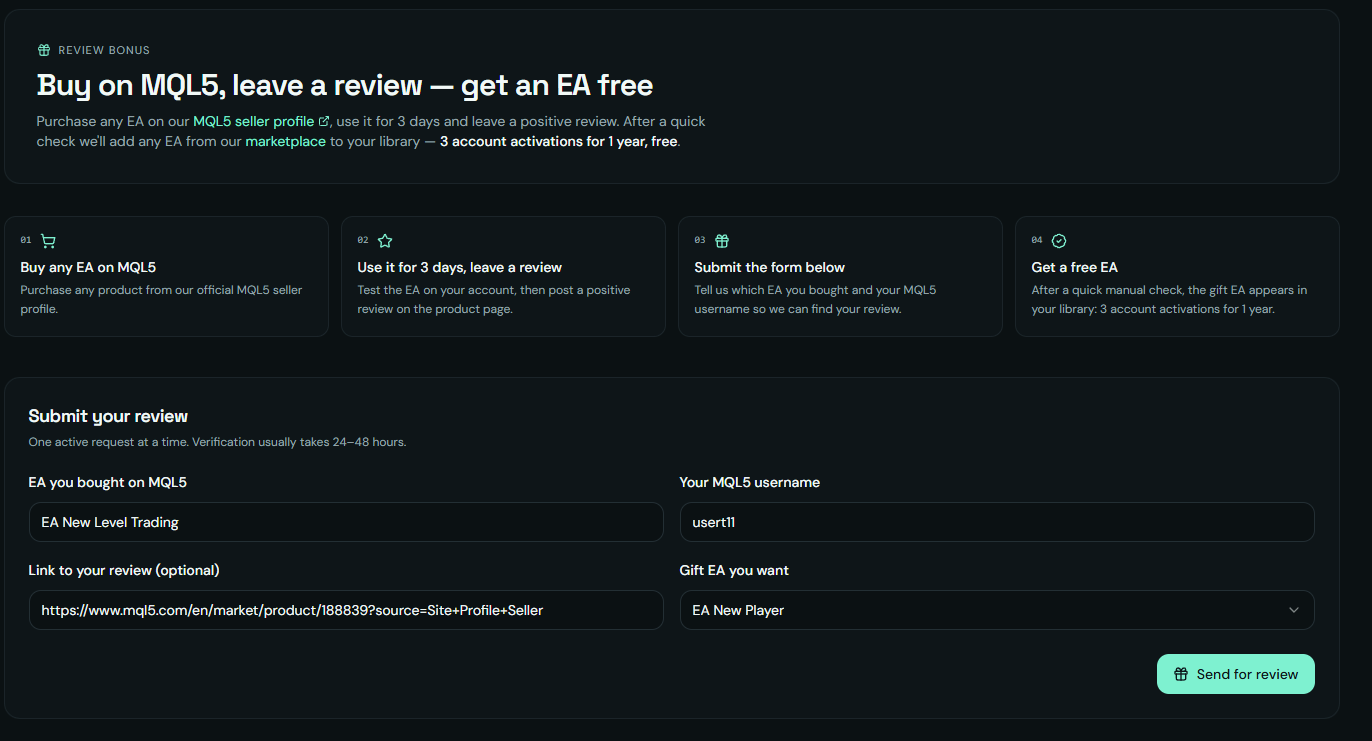
- EA you bought on MQL5 — the exact product name
- Your MQL5 username — so we can find your review
- Link to your review (optional, but speeds up verification)
- Gift EA you want — pick any product from the list
- Gift platform version — MetaTrader 4 or MetaTrader 5
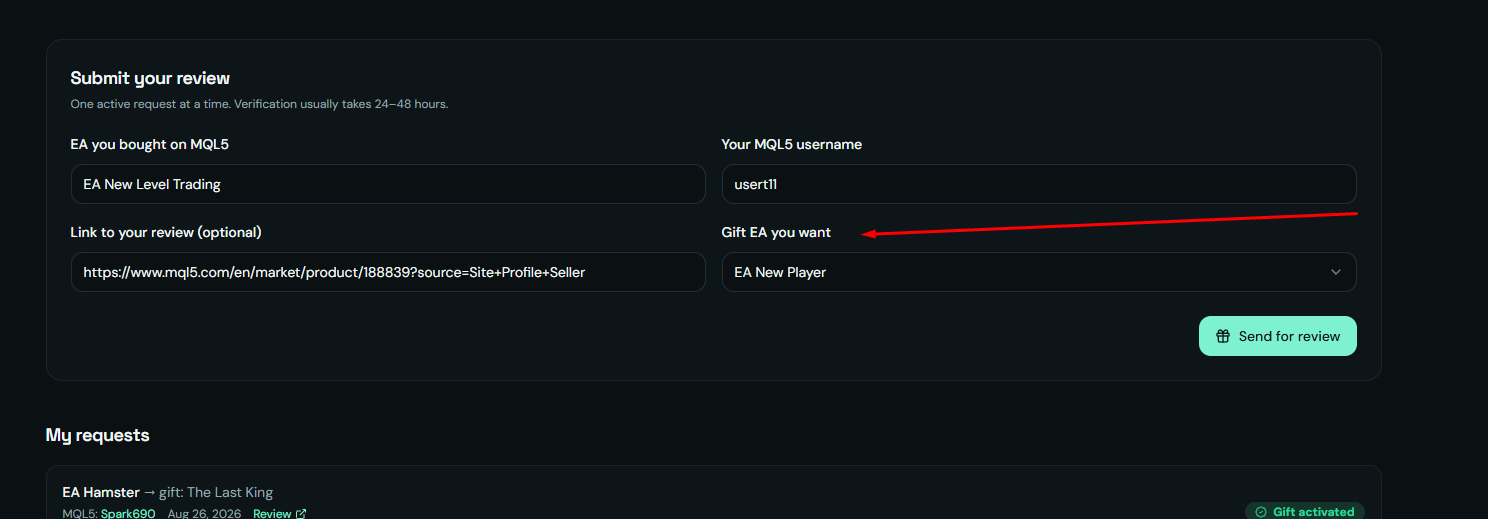
Click Send for review — your request appears under My requests with the status Under review.
Step 6 — Receive your free gift license
Time: 24–48 hours. Our team manually verifies the review. Once approved, the status changes to Gift activated and the license appears automatically in your dashboard under My library and Bonus gifts — enter your account number and activate it like any regular license.
Frequently asked questions
Do I need an account on your website? Yes. Registration and sign-in are required — the bonus form and the gift license both live in your personal dashboard. Sign-up takes about a minute with email or Google.
How long does the whole process take? About 3 days of EA testing + 24–48 hours of verification. The form itself takes 2 minutes.
Can I choose MT4 or MT5? Yes — the bonus form has a platform selector. Choose MetaTrader 4 (.ex4) or MetaTrader 5 (.ex5) for your gift EA.
Which EA can I choose as a gift? Any published EA from our marketplace. Indicators and utilities marked as free are excluded — pick a paid product to get the most value.
Can I request more than one bonus? One active request at a time. After your request is approved and the gift is activated, you can submit a new one for another purchased product.
What if my request is rejected? You will see the reason in your dashboard. Most rejections happen because the review could not be found — double-check your MQL5 username and review link, then submit again.
Ready? Buy on MQL5, leave your review, and claim your free EA today.