· Guides
EA Super Trend XAUUSD V20.0 in one paragraph
EA Super Trend XAUUSD V20.0 is a MetaTrader 5 Expert Advisor for gold (XAUUSD). It makes every decision with built-in ONNX neural models that read the market on closed M30 bars — whatever timeframe your chart is set to. On the chart it draws a cyberpunk-style control panel with account data, model signals, open positions, EA statistics and one-click close buttons. This article explains how the robot works and why you should close its trades from that panel, not from the standard MT5 Trade tab.
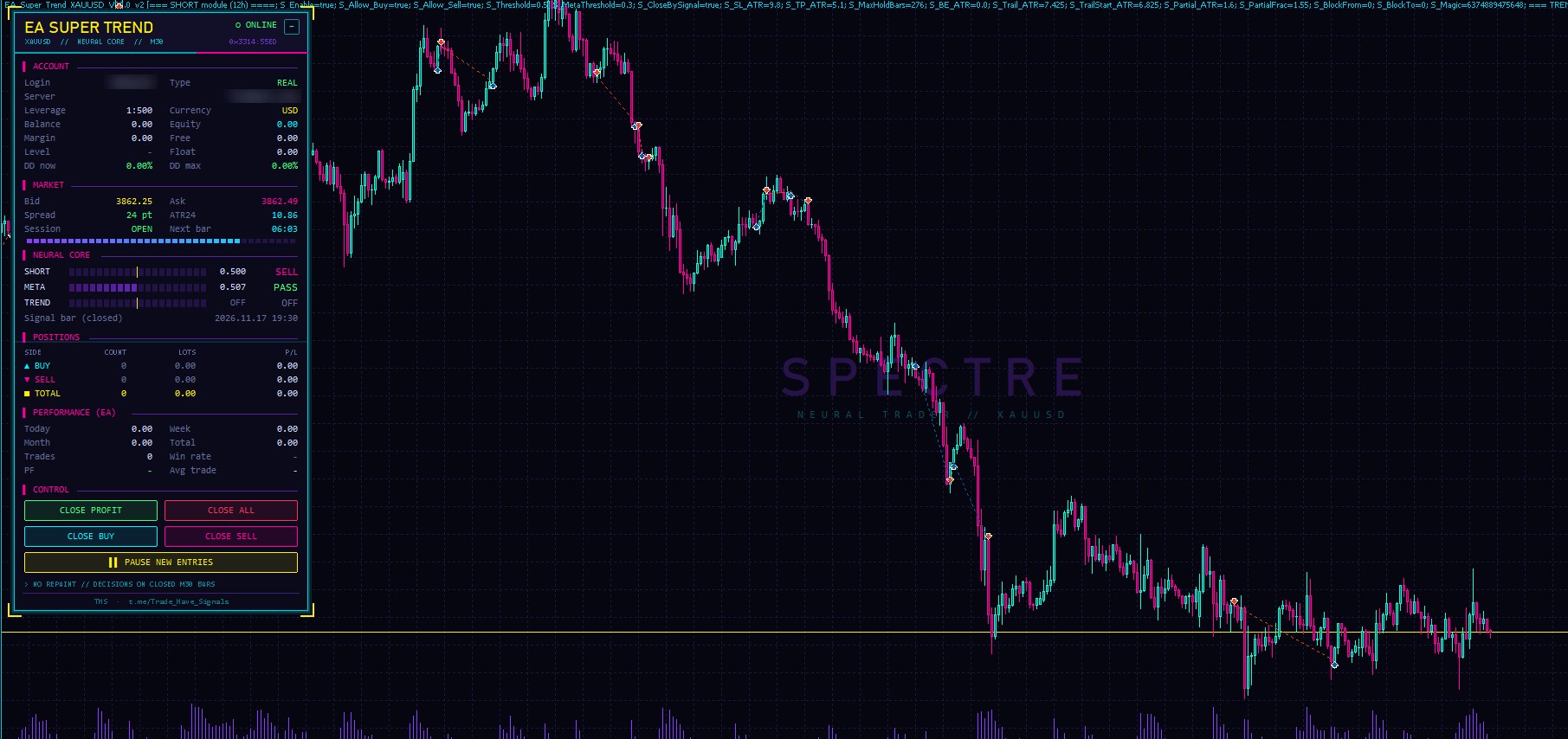
Looking for every input explained? See the related EA Super Trend XAUUSD PRO settings guide. Always compare articles with the Inputs tab of the build you actually installed.
1. How the EA makes decisions
No repaint, no look-ahead
- The models only see closed M30 bars — the bar that is still forming is never used.
- Entries and exits happen on the first tick of the next bar, at the real Bid/Ask.
- ATR-based stop moves (breakeven and trailing) are calculated from closed bars and applied once per new bar, the same way as in the backtest.
- The panel statistics are read from the real account history, not from an internal counter.
The panel reminds you of this with the line NO REPAINT // DECISIONS ON CLOSED M30 BARS.
Two independent modules
The EA contains two trading modules. Each one holds at most one position at a time and has its own magic number, so their trades never mix.
| Module | Horizon | Default state | What it does |
|---|---|---|---|
| SHORT | about 12 hours | On | Direction model plus an optional meta filter that confirms or rejects the signal |
| TREND | 2–4 days | Off | Separate longer-term direction model with its own stops and time filter |
Reading the NEURAL CORE block
- SHORT — the direction score of the 12-hour model (0…1) with the current verdict: BUY, SELL or nothing.
- META — the second-opinion model. PASS means the candidate trade is allowed; otherwise the entry is skipped.
- TREND — the 2–4 day model, shown as OFF while the module is disabled.
- Signal bar (closed) — the time of the closed M30 bar these values come from.
A BUY requires the score to be above the confidence threshold; a SELL requires it to be below 1 − threshold. Raising the threshold widens the "no-trade" zone in the middle. A model score is not a probability of profit — it only ranks signals.
Filters before an entry
A new position opens only if all of these pass:
- the module has no open position yet;
- new entries are not paused from the panel;
- the spread is below
max_spread; - the META filter passes (SHORT module);
- the hour is not blocked for that module;
- the trading time window allows it (server time, chosen weekdays, optional Friday cut-off hour).
2. How positions are managed
Stops and targets in ATR
Stop loss and take profit are set as multiples of ATR(24) on M30 measured at signal time, so they adapt to gold's current volatility (the panel shows the live value as ATR24).
Ways a trade can close
- Stop loss or take profit hit.
- Opposite signal — if enabled, a position closes when its model flips direction.
- Time exit — after a set number of M30 bars.
- Breakeven and trailing — in two layers: ATR-based (once per bar) and point-based (every tick, with a profit lock and a minimum step).
- Partial close — once per position at +X ATR. The fraction must be between 0 and 1, otherwise the EA prints a warning and the partial close never triggers.
- Outside trading time — optional forced close of EA positions.
Position size
With RiskPercent > 0 the lot is calculated so that hitting the stop loses that percentage of the balance; with RiskPercent = 0 the fixed lot is used. Margin is checked before every order. Gold moves fast: start with a small risk per trade on a demo or cent account and raise it only after you have seen the EA work live.
3. The panel, block by block
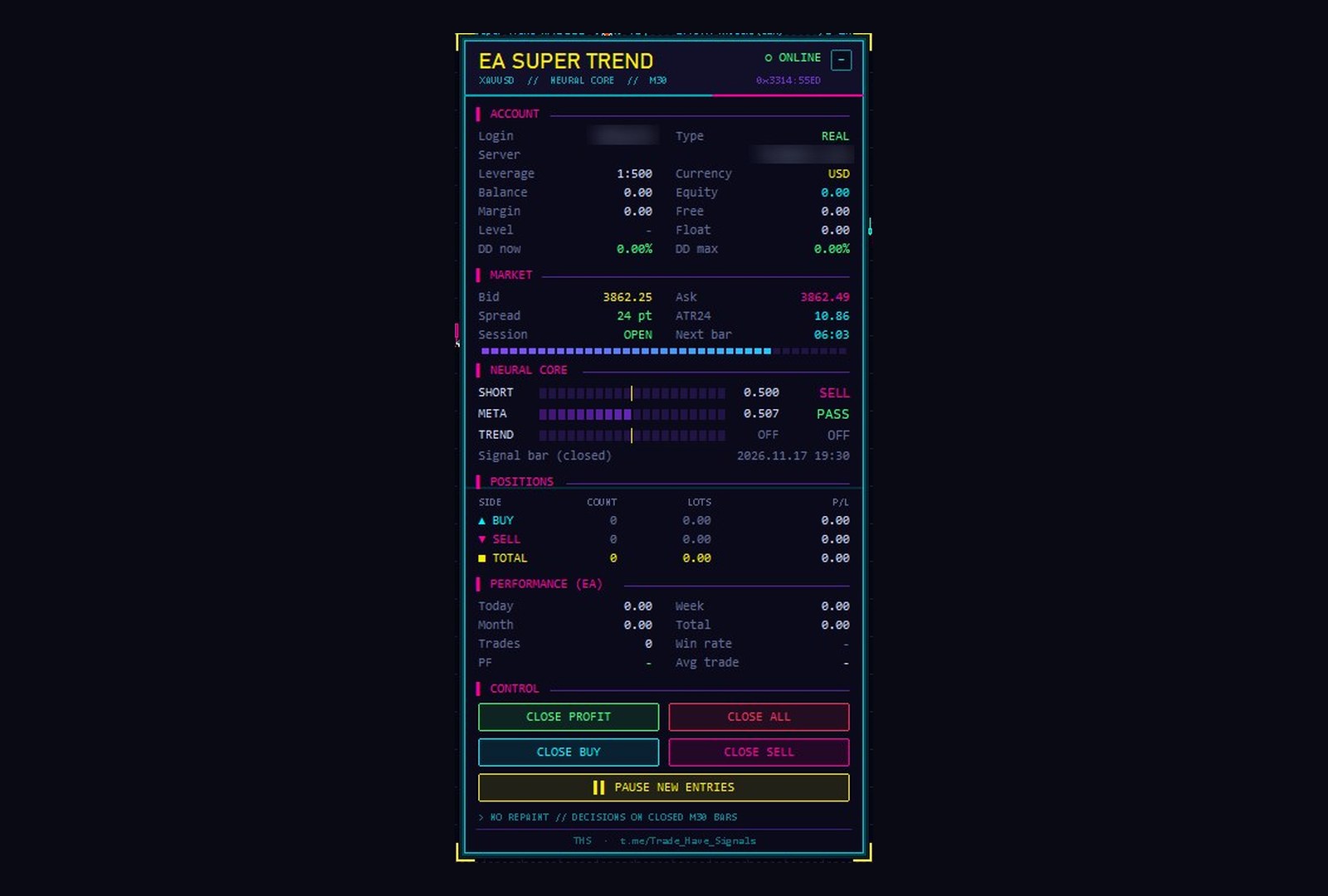
- ACCOUNT — account type, leverage, balance, equity, margin, floating P/L, current and maximum drawdown.
- MARKET — Bid/Ask, spread, ATR24, session status and a countdown to the next M30 bar.
- NEURAL CORE — model signals (see above).
- POSITIONS — BUY, SELL and total: count, lots and P/L.
- PERFORMANCE (EA) — today, week, month, total, number of trades, win rate, profit factor and average trade.
- CONTROL —
CLOSE PROFIT,CLOSE ALL,CLOSE BUY,CLOSE SELLandPAUSE NEW ENTRIES.
4. Why close trades from the panel
You can close any position in the MT5 Trade tab, but for this EA the panel buttons are the better choice.
The panel keeps the history clean
When the panel closes a position, the closing deal carries the same magic number as the position. A manual close from the terminal is recorded as a client deal without the EA's magic. That matters because:
- the PERFORMANCE (EA) block and any monitoring tool that groups trades by magic see the full trade — entry and exit;
- SHORT and TREND results stay separated;
- your statistics and live monitoring match what the EA really did.
It only touches what it should
- Buttons work only on the chart symbol (XAUUSD).
- With the default scope EA, they close only SHORT and TREND positions and leave your manual trades and other robots alone. Switch
Panel_Scopeto all positions only if you really want that.
One click instead of many
| Button | What it closes |
|---|---|
CLOSE PROFIT |
Only positions whose profit + swap is above zero — lock in gains and let losers follow the EA rules |
CLOSE ALL |
Every position in the panel scope |
CLOSE BUY / CLOSE SELL |
Only one direction |
Protection from mistakes
- With
Panel_ConfirmClose = trueevery button asks "Close … on XAUUSD?" before doing anything. - After the action the panel shows the result, for example
CLOSE ALL: 2 / 2 CLOSED, orNOTHING TO CLOSE. Failed closes are written to the Experts log with the broker's reason.
Pause instead of removing the EA
PAUSE NEW ENTRIES stops new trades but keeps managing open positions: stops, breakeven, trailing, partial and time exits keep working. The pause state is saved and survives a terminal restart. Removing the EA from the chart would leave open trades without that management — so before news, weekends or a VPS move, pause first, then close what you need with the buttons.
5. Quick start
- Open an XAUUSD chart in MetaTrader 5 (any timeframe — the EA always uses M30 data).
- Attach the EA and enable Algo Trading.
- Set a low risk per trade and check the trading time window in server time.
- Make sure the panel shows
ONLINEand the session isOPEN. - Let the EA trade; use the panel buttons whenever you need to close positions manually.
Important notes
- The models were trained on historical XAUUSD data. A Strategy Tester run on that period is in-sample and the EA prints a warning about it — test on data after the training end date for an honest picture.
- On symbols other than gold the signals have no proven edge.
- Past results, backtests and model scores do not guarantee future profit. Trade only money you can afford to lose.